Not legal advice. Counsely is not a law firm and does not provide legal advice. For an important contract, talk to a licensed lawyer before you sign.
When the other side sends back a revised contract, Counsely compares it with the version you already have, clause by clause, right on your iPhone. You see every clause that was added, removed or changed, with the different words highlighted, and you can ask for a plain-language note on what each change means for you.
Compare versions is part of Counsely Pro. It works with contracts you scanned, imported or created in Counsely.

Pro feature · iPhone and iPad · iOS 18 or later
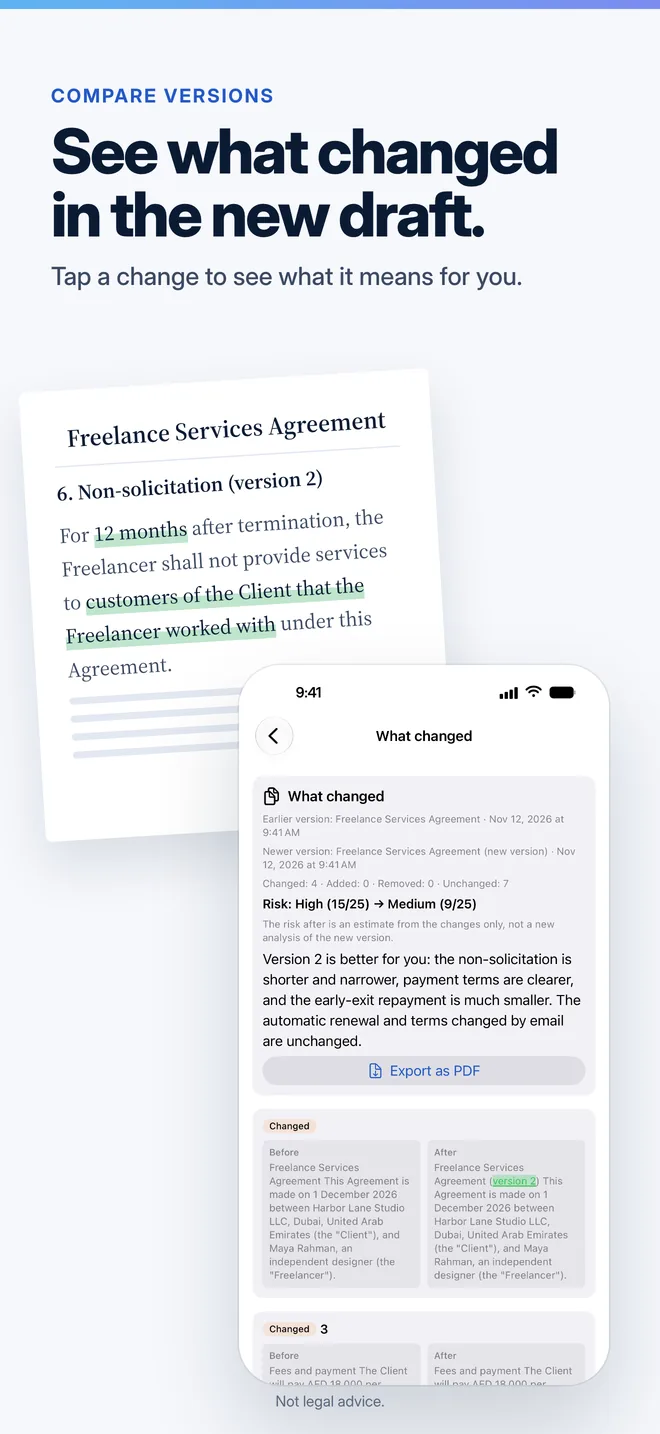
How to compare two versions of a contract
- Open the earlier version. In History, open the contract you already have. It can be one you scanned, imported or created in Counsely.
- Add the new version. Tap Compare with new version, then scan the new pages, pick photos, or choose a PDF or Word (.docx) file. Counsely reads the new version on your iPhone.
- Read what changed. The comparison counts the changed, added, removed and unchanged clauses, then shows each change with its Before and After text side by side.
- Ask what it means. Tap Explain the changes to get a note on each change, a short summary and an estimate of the risk before and after. Export the comparison as a PDF if you want to share it.
The new version is saved in History, linked to the earlier one, so you can open the comparison again later.
What the comparison shows
- The What changed card. The title and date of both versions and a count of Changed, Added, Removed and Unchanged clauses.
- Each changed clause. A label (Added, Removed or Changed), the clause heading when there is one, and the Before and After text in two columns.
- Highlighted words. In a changed clause, the words that differ are marked: struck through in red on the Before side and in green on the After side.
- PDF export. Export as PDF saves the comparison, with the notes if you asked for them, so you can send it to the other party or to your lawyer.
What it ignores, so you only see real changes
Revised contracts often come back with a new layout. Counsely compares the wording, not the formatting, so these differences never show up as changes:
- Line breaks, page breaks and spacing
- Page numbers and running headers or footers at the top or bottom of a page
- Words split across the end of a line
- Upper and lower case, accents and quote styles
- The numbers in clause headings, so a renumbered clause is not a change by itself
Because accents are ignored, an edit that only adds or removes an accent is not shown. If a name or a word with accents matters, check it yourself in both versions.
Explain the changes: what each change means for you
The comparison itself runs on your iPhone. When you tap Explain the changes and agree to share the text with our AI provider, Counsely sends only the changed clauses, plus the earlier version's analysis when there is one. You get back:
- A note on each change, marked Better for you, Worse for you or Neutral, with a quote from the clause it refers to.
- A short summary of what changed overall.
- Risk before and after. The earlier version's risk level and an estimate for the new one. The estimate comes from the changes only; it is not a new full analysis of the new version.
The notes are written in the app's language. Use them as a list of questions for the other party, not as a verdict.
When comparing versions helps
- A client returns your contract with edits. See what they changed before you agree, including edits they did not mention.
- A landlord sends a renewal. Compare the new lease with last year's to spot new fees, notice periods or rules.
- An employer updates an offer. Check whether pay, notice, non-compete or other terms moved between drafts.
- You negotiated a clause. Confirm that the agreed change is in the final text and that nothing else changed with it.
Limits to know
- Pro only. Compare versions needs a Pro subscription. Credit packs do not unlock it.
- Two versions at a time. You compare the contract you opened with the new version you add.
- Scans need to be readable. Blurry photos can cause reading errors that look like changes. Import the original PDF or Word file when you have it.
- Languages. Counsely reads contracts in up to 30 languages. Photos and scans: 15 languages on iOS 18, 24 on iOS 26 and 26 on iOS 27. PDFs with selectable text: all 30.
- Only the text. It does not check signatures, annexes that are not in the file, or what was agreed by email or phone.
- AI notes can be wrong. The highlighted differences come straight from the two texts; the notes and the risk estimate come from an AI model and can miss or misread something.
Pricing
Compare versions is included in Pro, at $9.99 per month or $79.99 per year, with 30 analyses and 15 contract creations a month, contract questions, negotiation help and Send for signature. The Free plan includes 2 analyses and 1 contract a month, without version comparison.
See every plan on the pricing page.
Privacy
Counsely reads the new version on your iPhone and computes the comparison on the device. Nothing is sent until you tap Explain the changes and agree; then only the changed clauses go to our AI provider. Our relay does not store or log your text, and the AI provider deletes it within 30 days under its standard API policy. Your contracts and comparisons stay on your device.
Details are in the Privacy Policy.
Related guides
- Spot hidden contract risks before you sign
- Send a contract for signature from iPhone
- AI contract review and generator app for iPhone
Frequently asked questions
How do I compare two versions of a contract on iPhone?
Open the earlier version in Counsely's History, tap Compare with new version and add the new one from a scan, photos, a PDF or a Word file. Counsely shows every added, removed and changed clause.
Is Counsely's contract comparison free?
No. Compare versions is part of Counsely Pro, at $9.99 per month or $79.99 per year. Credit packs do not unlock it.
Does Counsely upload my contract to compare it?
No. The comparison runs on your iPhone. Only if you tap Explain the changes and agree are the changed clauses sent to our AI provider.
Will formatting changes show up as differences?
No. Line breaks, page numbers, headers and footers, case, accents, quote styles and clause numbering are ignored, so only changes in wording appear.
Can Counsely tell me if a change is bad for me?
Explain the changes marks each change as Better for you, Worse for you or Neutral, with a short note. It is AI output, not legal advice, so check important changes with a lawyer.
Can I compare a scanned paper contract with a PDF?
Yes. Each version can come from a scan, photos or a file. Clear scans give the best results, because reading errors can look like changes.
See what changed before you sign
Written by Caetano Spuldaro Neto, developer of Counsely · Last updated November 9, 2026