Not legal advice. Counsely is not a law firm and does not provide legal advice. Always consult a licensed attorney before signing or acting on any contract.
Counsely is an iPhone app that creates a non-disclosure agreement (NDA) from a guided template: you answer a few questions, Counsely drafts the NDA, and you export it as a PDF with signature blocks. The Free plan includes 1 contract creation per month; Pro adds side-by-side bilingual NDAs.
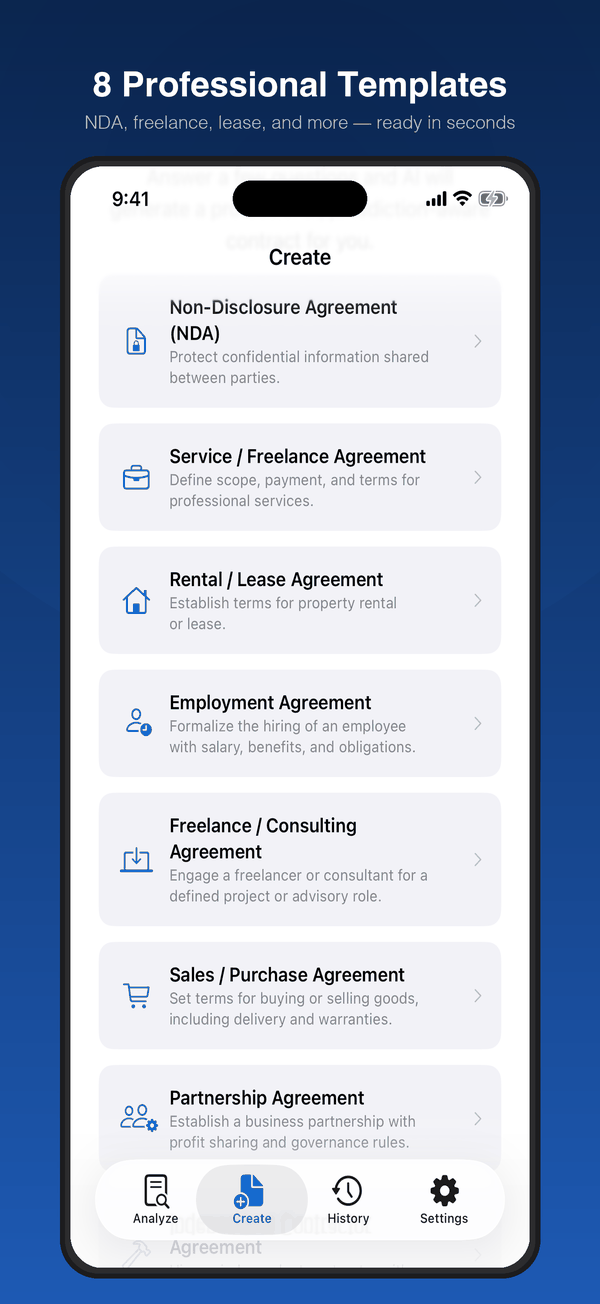
The NDA is one of 8 templates in the AI contract review and generator app, which also reviews contracts you receive.

Free to download · iPhone and iPad
What an NDA generator does
An NDA generator turns your answers to guided questions into a draft non-disclosure agreement, with standard clauses and signature blocks, ready for you to review. You start from a structured draft instead of a blank page.
A downloaded Word template works differently. You fill in every blank by hand, and the wording stays the same wherever the agreement will be used.
You enter the jurisdiction and Counsely names it in the draft. Have a local lawyer check it against local law. That gives you a starting point for your NDA.
If you also need agreements for client work, see the contract generator for freelancers.
How to create an NDA in Counsely
Creating an NDA takes five steps and uses one contract creation from your plan.
- Open Create. Download Counsely: AI Contract Analyzer from the App Store and open the Create tab.
- Choose the NDA template. Select Non-Disclosure Agreement.
- Answer the guided questions. The wizard asks for the disclosing party, the receiving party, the purpose, the type (mutual or one-way), the duration (1, 2, 3 or 5 years), the jurisdiction, any exclusions (optional), the language and "Would you like a bilingual (two-language) contract?". Answer "No (single language)" or pick a second language.
- Confirm consent. Confirm sending your answers to the AI provider for drafting.
- Review and export. Read the draft and export it as a PDF.
On every plan, Counsely also runs an automatic risk analysis on the NDA it creates. You see its risk score and color-coded clauses before you send it to the other party.
What a good NDA usually covers
Most NDAs answer the same basic questions about what is secret, who must keep it secret and for how long. This general checklist can help you read any draft, including one from Counsely. In Counsely, you set the parties, purpose, duration, exclusions and jurisdiction in the wizard; read the draft to check how the rest is worded.
- Definition of confidential information: what counts as confidential, such as business plans, client lists, source code or prices.
- Exclusions: information that is not covered, for example information that is already public or that the receiving party already knew.
- Obligations of the receiving party: how the information may be used and who it may be shared with.
- Term: how long the duty of confidentiality lasts.
- Return or destruction: what happens to the information when the relationship ends or when the disclosing party asks for it back.
- Remedies: what the disclosing party can do if the agreement is breached.
- Governing law and venue: which rules apply and where disputes are heard.
What belongs in your NDA depends on your deal and local law.
Mutual vs one-way NDA
A one-way NDA protects information that one party shares with the other. It fits situations where only one side discloses, such as a founder showing a product to a potential contractor.
A mutual NDA protects information that both parties share with each other. It fits situations where both sides disclose, such as two companies exploring a joint project.
Counsely lets you choose mutual or one-way in the NDA wizard. Before you sign, check which type your draft is and whether it matches how information will actually flow between you.
Watch for a non-compete hidden in an NDA
Some NDAs include clauses that go beyond confidentiality, such as a non-compete or a non-solicitation clause that limits who you can work with afterward. When you analyze a contract in Counsely, the Fine Print Detector flags hidden non-compete and non-solicitation clauses, so you can ask about them before signing. Learn how the 1–25 risk score works.
Plans for NDAs
You can create an NDA on any plan. The Free plan includes 1 contract creation per month in 7 languages (English, Arabic, French, German, Italian, Portuguese (Brazil) and Spanish). Credits and Pro unlock all 30 creation languages; bilingual NDAs need Pro. Compare plans and USD prices on Counsely pricing.
Bilingual NDAs (Pro)
With Pro, Counsely can produce your NDA in two languages side by side. Both parties can read the same agreement in their own language.
A bilingual NDA from Counsely has:
- a two-column layout, one language per column;
- identical section numbering in both languages, so each clause lines up with its translation;
- a language-precedence clause, added automatically, that states which version controls if the two differ.
The second language is generated by AI. It is not a certified translation. If you need one, use a qualified translator.
Read more about the side-by-side bilingual contract template, the Arabic-English contract template or the Russian-English contract template.
What the PDF includes
Counsely exports your NDA as a PDF that you can share directly from the app.
The PDF includes:
- Counsely branding;
- signature blocks for the parties;
- page numbering;
- a notice that the content was generated with AI.
Privacy
Scans are read on your iPhone with Apple Vision and never uploaded. Text is sent to our AI provider only after you confirm, for each document, and our relay does not store or log it. Our AI provider does not use inputs or outputs submitted through its API to train its models by default. No ads. Usage analytics only, never your documents.
There is no account and no document storage on our servers. Your NDAs, analyses and other contracts are stored locally on your device, with no cloud sync. Details are in the Privacy Policy.
What an NDA generator can't do
A generated NDA is a draft. Know its limits before you rely on it:
- It does not replace a lawyer. Counsely cannot advise you on your situation or tell you whether to sign.
- It does not guarantee enforceability. Whether an NDA holds up depends on the parties and on local law.
- It only knows your answers. It cannot check facts you did not enter, such as what was agreed verbally.
- Laws change. A draft may not reflect the laws that apply to you or recent changes to them.
For NDAs that protect high-value information, have a licensed attorney review the draft before anyone signs.
Frequently asked questions
Is the Counsely NDA generator free?
Yes, within the Free plan's limit of 1 contract creation per month. More creations come with credits or Pro.
How do I create an NDA on my iPhone?
Open Counsely, choose the Non-Disclosure Agreement template, answer the guided questions, confirm sending your answers for drafting, then review and export the PDF.
Can I make a bilingual NDA?
Yes, with Pro. The second language is AI-generated, not a certified translation.
What is the difference between a mutual and a one-way NDA?
A one-way NDA protects information shared by one party; a mutual NDA protects information both parties share with each other.
Is an NDA made with an app legally binding?
Whether any contract is binding depends on the parties' agreement and local law, not on the tool that drafted it.
Are my NDA answers stored?
Your NDA is saved only on your device. Your answers are sent for drafting only after you confirm, and our relay does not store or log them.
Create your NDA with Counsely
See everything in the AI contract review and generator app. Questions? See Support and our Privacy Policy.
Written by Caetano Spuldaro Neto, developer of Counsely · Last updated October 11, 2026