Not legal advice. Counsely is not a law firm and does not provide legal advice. Always consult a licensed attorney before signing or acting on any contract.
Counsely reviews a contract on your iPhone and gives it an overall risk score from 1 to 25, with every clause color-coded as Critical, High, Medium or Low. A Fine Print Detector flags clauses such as hidden non-competes, unilateral changes, auto-renewals, low liability caps and hidden fees, and a Way Out summary lists exit rights, penalties and notice periods.
This page explains each part of a Counsely review in detail. For the full app, including contract creation, see the AI contract review and generator app.

2 free contract checks a month · iPhone and iPad
How Counsely's contract risk check works
A Counsely review takes four steps, from scanning the contract to taking your questions to the other party.
- Scan or import. Scan the paper contract with your iPhone camera or import a PDF. Counsely reads contracts in up to 30 languages (PDFs with text; scans: 15+ depending on iOS).
- Confirm consent. Confirm sending the extracted text for AI analysis.
- Read the results. Review the risk score, the clause levels, the plain-language summary and the Way Out summary.
- Take questions further. Raise flagged clauses with the other party before signing.
Each review uses one analysis from your plan: 2 per month on Free, 30 per month on Pro, or 1 credit each. Nothing is sent before you confirm, and each document needs its own confirmation. The analysis is written in the app's language, one of its 18 interface languages. If you work with Arabic documents, see the Arabic-English contract template page.
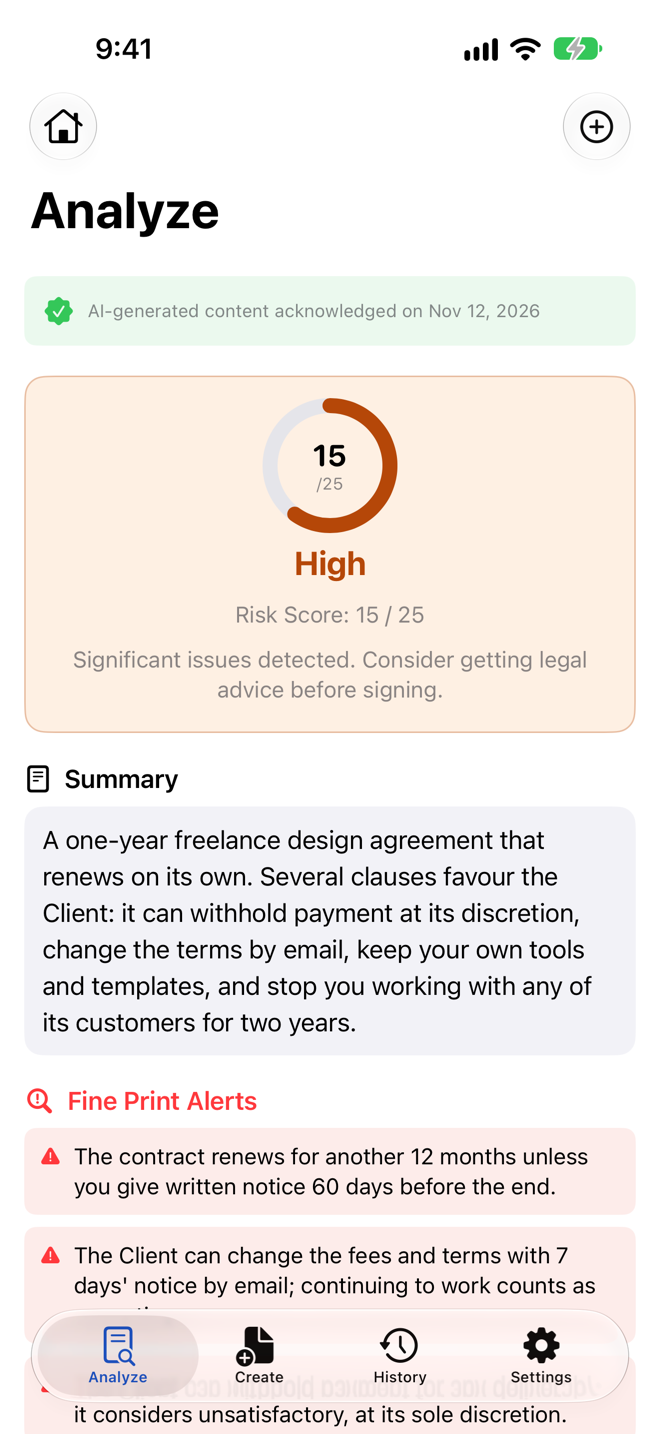
The 1 to 25 risk score
The risk score is a single number that summarizes the contract's overall risk. The AI model gives this score after reading the full text. A higher score means higher risk; 25 is the highest.
Behind the overall score, each clause is scored on two factors:
- Severity: how much harm the clause could cause you if it applies, from 1 to 5.
- Probability: how likely it is that the clause will actually come into play, from 1 to 5.
Multiplying severity by probability gives each clause its own score, and each clause gets a risk level. The overall score is a composite judgment by the model, not a fixed formula. Read it as a summary, then look at the individual clauses.
There is no universal scale for contract risk. Other tools use different scales, so a score from one tool cannot be compared with a score from another. Use Counsely's score to compare clauses within the same contract, and to decide where to start reading.
A score is not a verdict. A contract with few flags can still contain a term that matters a lot to you, and a contract with many flags may still be acceptable once you understand it.
Four severity levels: Critical, High, Medium, Low
Each level has its own color: red for Critical, orange for High, yellow for Medium and green for Low. The colors let you scan a long contract and jump to the clauses that need attention.
- Critical: the clause could cause serious harm and deserves your attention first. Read it in full.
- High: the clause carries significant risk. Raise it with the other party and ask whether it can change.
- Medium: the clause is worth understanding. It may be standard, but check that it fits your situation.
- Low: the clause carries little risk on its face. Still read it, because context the app cannot see may matter.
Start with Critical and High, then work down. The levels describe the text; they do not tell you whether a clause is enforceable where you live.
What the Fine Print Detector flags
The Fine Print Detector looks for clauses that are easy to miss or easy to underestimate. Among others, it flags the clauses below. For each one, here is a question you can ask the other party.
- Hidden non-compete and non-solicitation clauses. These limit where you can work, or whose clients and staff you can approach, after the contract ends. Ask: "How long does this restriction last, and where does it apply?"
- Unilateral modification rights. This wording lets one side change the terms without your agreement. Ask: "Can changes require written consent from both parties?"
- Auto-renewal without clear notice windows. The contract renews unless you cancel within a short or hard-to-find window. Ask: "When exactly must I give notice to stop the renewal, and how?"
- Very low liability caps. These limit what the other side would owe you to far less than what is at stake. Ask: "Can the cap reflect the value of this contract?"
- Hidden fees. These are charges buried in the text, away from the main price. Ask: "Can all fees be listed in one place?"
- One-sided terms. These are obligations, rights or penalties that apply to only one party. Ask: "Can this apply to both of us?"
A flag is a prompt to read the clause carefully. It does not mean the clause is unlawful.
The Way Out summary
The Way Out summary shows how you can leave the contract, in one place.
Exit terms are often spread across several clauses. A termination clause may refer to a notice clause, which refers to a fee schedule. The Way Out summary pulls them together, so you can see the cost of leaving before you commit.
For each way out, note how much notice you must give, in what form, and what leaving would cost you.
Check the summary against the clauses it cites. If the exit terms matter to you, for example on a lease or a long service contract, confirm them with the other party in writing.
Jurisdiction-aware, not jurisdiction-certified
The same clause can be read differently depending on the legal system behind the contract. When it analyzes a contract, Counsely detects the jurisdiction from the governing-law clause and takes common law, civil law or mixed legal traditions into account.
If the contract has no governing-law clause, the model infers the legal tradition from the contract's language and structure. Counsely does not flag or score a missing governing-law clause, so check for one yourself and ask the other party to add it if it matters to you.
This is context, not a compliance check. Counsely does not confirm that a contract meets the laws of a specific country or state, and local rules change.
How accurate is AI contract review?
AI contract review is useful for finding questions to ask, but it can be wrong. Treat a Counsely review as a checklist, not a verdict.
- It can miss issues or make mistakes. The model may misread a clause, flag something harmless or fail to flag a real problem.
- It depends on the scan. Blurry photos, poor lighting or low contrast can cause text recognition errors. Use good lighting and a high-contrast background, and import the original PDF when you have one.
- It only sees the text. It cannot check facts outside the document, such as whether the other party is who they say they are or what was agreed verbally.
- It reads three languages. Counsely analyzes contracts in up to 30 languages (PDFs with text; scans: 15+ depending on iOS). A contract in another language cannot be reviewed.
- Laws vary and change. The review may not reflect the laws that apply to you or recent changes to them.
For important or high-value contracts, have a licensed attorney review the contract before you sign.
Also check contracts you create
On every plan, every contract you create in Counsely gets an automatic risk analysis. Pro includes 15 creations per month; with credits, each creation costs 2 credits.
That helps you spot one-sided terms before you send the draft to the other party. You can create a contract with the free NDA generator, the contract generator for freelancers or, on Pro, the side-by-side bilingual contract template.
Automatic risk analysis of contracts you create is included on every plan, including Free.
Got a revised draft back after you raised these points? Compare the two versions to see exactly what changed.
Privacy
Scans are read on your iPhone with Apple Vision and never uploaded. Text is sent to our AI provider only after you confirm, for each document. Our relay does not store or log your text; the AI provider deletes it within 30 days under its standard API policy (longer only where required by law or for content flagged under its usage policy). Our AI provider does not use inputs or outputs submitted through its API to train its models by default. No ads. Usage analytics only, never your documents.
There is no account and no document storage on our servers. Your documents and analyses are stored locally on your device, with no cloud sync. Details are in the Privacy Policy.
Frequently asked questions
What does Counsely's 1 to 25 risk score mean?
A higher score means higher risk; 25 is the highest.
What hidden risks does Counsely look for?
See the Fine Print Detector list above: non-competes, unilateral changes, auto-renewals, low liability caps, hidden fees and one-sided terms.
What is the Way Out summary?
A summary of how you can exit the contract: termination rights, penalties and notice periods.
How accurate is AI contract review?
It can miss issues or make mistakes. Use it to find questions to ask.
Which contract languages can Counsely review?
Counsely reads contracts in up to 30 languages (PDFs with text; scans: 15+ depending on iOS).
How many contracts can I check for free?
2 per month on the Free plan; each extra analysis costs 1 credit, and Pro includes 30 per month.
More plan details are on the Counsely pricing page.
Check your next contract with Counsely
See everything in the AI contract review and generator app. Questions? See Support and our Privacy Policy.
Written by Caetano Spuldaro Neto, developer of Counsely · Last updated October 12, 2026