Not legal advice. Counsely is not a law firm and does not provide legal advice. Always consult a licensed attorney before signing or acting on any contract.
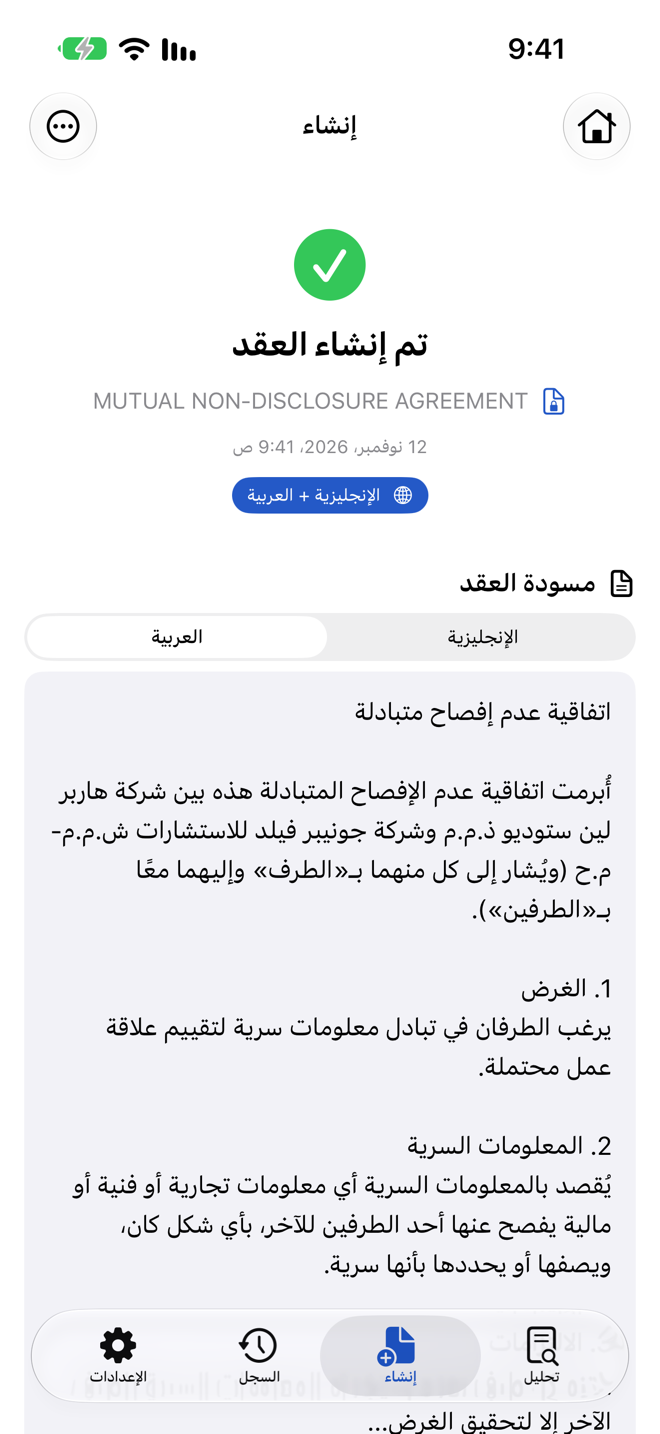
Counsely creates Arabic-English contracts on iPhone: pick one of 8 templates, such as an NDA, service, rental or employment agreement, answer the guided questions, and export a PDF with Arabic and English side by side, identical section numbering and an automatic language-precedence clause (Pro).
This page focuses on one language pair. For everything else the app does, see the AI contract review and generator app.

Free to download · iPhone and iPad
Create an Arabic-English contract from your iPhone
You create an Arabic and English contract in the same guided flow as any other Counsely contract.
- Pick a template. Choose one of the 8 contract templates.
- Answer the guided questions. Enter the jurisdiction and the details of the deal: the parties, the work, goods or property, payment and dates.
- Add the second language. Set Arabic or English as the main language. When the wizard asks "Would you like a bilingual (two-language) contract?", choose the other one instead of "No (single language)". On the Free plan, choosing a second language opens the Pro upgrade screen.
- Confirm consent. Counsely asks you to confirm before it sends your answers to its AI provider for drafting.
- Review and export. Check the draft and export the PDF.
On every plan, Counsely also runs an automatic risk analysis on the contract it creates, so you see a risk score and color-coded clauses before you share it.
For a rental agreement, use the rental agreement template (in English), or the Arabic lease agreement page.
Templates you can create in Arabic and English
Counsely has 8 templates. Each one is a starting point that you review and adapt. All 8 can be bilingual.
- Non-Disclosure Agreement (NDA): use when you share confidential information with a partner, supplier or employee and want it kept private. See the free NDA generator.
- Service / Freelance Agreement: use when an independent professional provides a service to a client.
- Rental / Lease Agreement: use when renting out a property, or to set out the terms of a rental you are entering.
- Employment Agreement: use when hiring an employee and setting out role, pay and working terms.
- Freelance / Consulting Agreement: use for consulting services, where you provide advice or expertise. Freelancers can read more in the contract generator for freelancers guide.
- Sales / Purchase Agreement: use when one party sells goods or assets to another.
- Partnership Agreement: use when two or more people or businesses run a venture together.
- Independent Contractor Agreement: use when you engage someone as a contractor rather than as an employee.
How the side-by-side PDF is laid out
The bilingual PDF puts Arabic and English in two columns, so every clause sits next to its translation. Both columns use identical section numbering, so clause 4 in Arabic matches clause 4 in English. The language-precedence clause states which version controls if the two texts differ.
When the app's interface language is English, the Arabic column is laid out right to left and the English column left to right. In other interface languages the right-to-left layout is not applied yet, so check the PDF before you share it. Before you sign, scroll through the whole PDF and check that each Arabic clause lines up with the matching English clause.
For more on how the precedence clause works, see the side-by-side bilingual contract template. Working with Russian instead? See the Russian-English contract template.
Arabic only, or English only?
You do not need Pro for a contract in a single language: the Free plan includes 1 contract creation per month in 7 languages, including Arabic and English. The side-by-side version needs Pro. See Counsely pricing.
Review an Arabic contract you received
Counsely can also review a contract someone sends you. It reads contracts in up to 30 languages (PDFs with text; scans: 15+ depending on iOS).
Scan the paper contract with your camera or import the PDF. Counsely gives the contract an overall risk score from 1 to 25 and labels every clause Critical, High, Medium or Low, with color coding so you can find the clauses that need attention.
The analysis appears in the app's language, one of its 18 interface languages, Arabic and English included. So you can review an Arabic contract and read the analysis in English, or the other way round. Read how the 1 to 25 risk score works.
Each review uses one analysis: the Free plan includes 2 per month, each extra analysis costs 1 credit, and Pro includes 30 per month.
Scan quality affects the result. Use good lighting and import the original PDF when you have one.
Before you sign: two checks
A generated bilingual contract is a draft. Two checks reduce the risk of a mismatch between the versions.
1. Have someone fluent in both languages compare the texts. They should confirm that each Arabic clause says the same thing as its English counterpart, including names, amounts, dates and notice periods. Arabic text may write numbers with Arabic-Indic digits or with Western digits; whichever is used, every figure must match the English column.
2. Ask a local lawyer two questions. Which version will prevail where the contract may be enforced, and do you need a certified translation for any authority?
The Arabic text in a Counsely contract is generated by AI.
Privacy
Scans are read on your iPhone with Apple Vision and never uploaded. Text is sent to our AI provider only after you confirm, for each document. Our relay does not store or log your text; the AI provider deletes it within 30 days under its standard API policy (longer only where required by law or for content flagged under its usage policy). Our AI provider does not use inputs or outputs submitted through its API to train its models by default. No ads. Usage analytics only, never your documents.
There is no account and no document storage on our servers. Your documents, analyses and contracts are stored locally on your device, with no cloud sync. Details are in the Privacy Policy.
Frequently asked questions
Can Counsely create a contract in Arabic and English side by side?
Yes, with Pro. Counsely exports a two-column Arabic-English PDF.
Can I create an Arabic contract on the Free plan?
Yes, in a single language. The side-by-side version needs Pro.
Can Counsely review a contract written in Arabic?
Yes. Counsely gives an Arabic contract a 1 to 25 risk score with color-coded clauses.
Which version wins if the Arabic and English texts differ?
The language-precedence clause in the contract states which version controls. How that is applied depends on local law.
Is the Arabic text a certified translation?
No. It is AI-generated. If an authority requires a certified translation, use a qualified translator.
Create your Arabic-English contract with Counsely
See everything in the AI contract review and generator app. Questions? See Support and our Privacy Policy.
Written by Caetano Spuldaro Neto, developer of Counsely · Last updated October 12, 2026