Not legal advice. Counsely is not a law firm and does not provide legal advice. Always consult a licensed attorney before signing or acting on any contract.
Counsely is an iPhone app that lets freelancers create a client contract from a guided template, choosing Service/Freelance, Freelance/Consulting or Independent Contractor, and export it as a PDF. It also reviews contracts that clients send you, with a 1–25 risk score and color-coded clauses. Contracts can be generated in 30 languages (7 on Free).
Creating and reviewing contracts happen in the same app. See the full overview of the AI contract review and generator app.

Free to download · iPhone and iPad
Three templates for freelance work
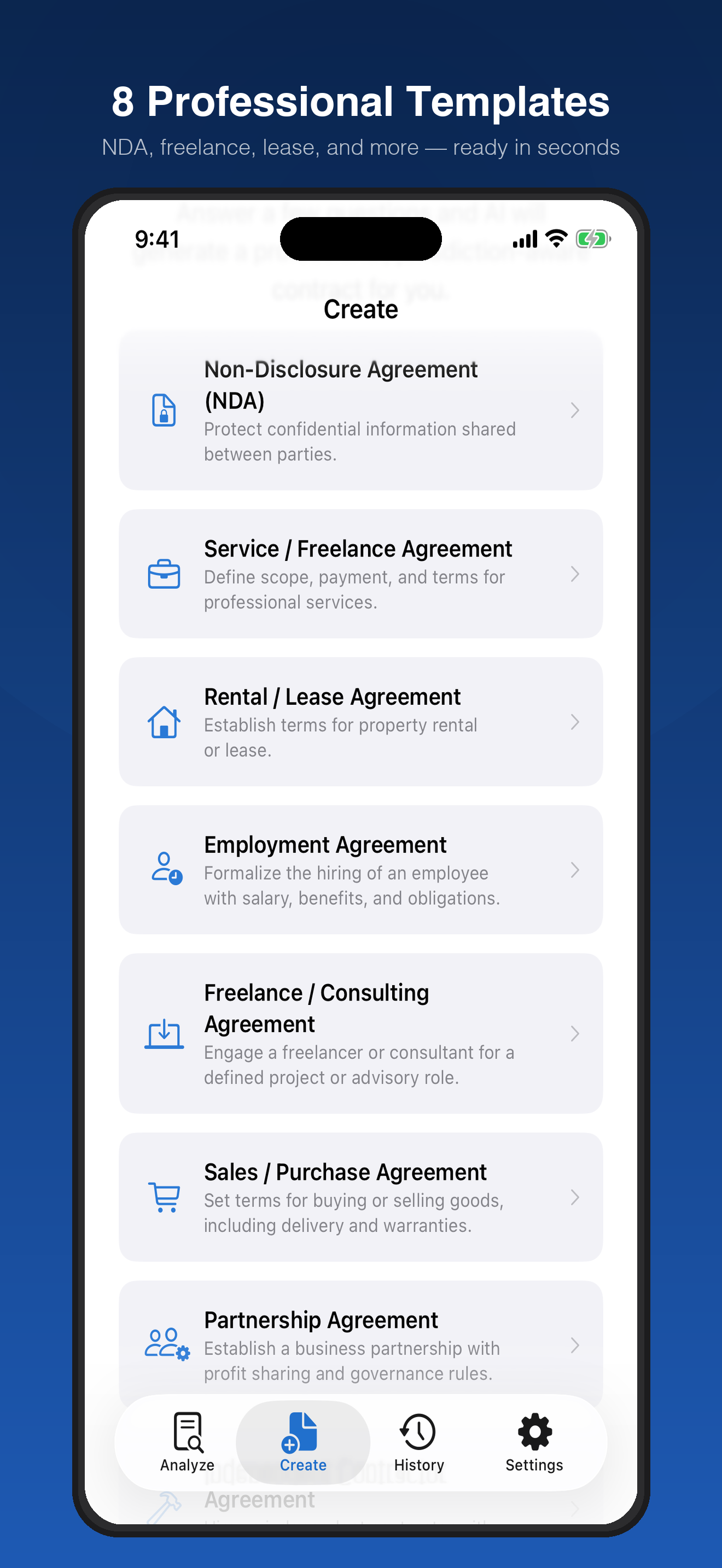
Three of Counsely's 8 templates fit freelance work. Pick the one that matches how you work with the client.
Service / Freelance Agreement. This template is for independent professionals who provide a service to a client, such as design, development, writing or photography. Use it when you deliver defined work for a fee.
Freelance / Consulting Agreement. This template is for consulting services, where you provide advice or expertise rather than a finished deliverable. Use it when the client pays for your knowledge and time.
Independent Contractor Agreement. This template is for engaging someone as a contractor rather than as an employee. Use it when the working relationship itself needs to be set out, for example when a client engages you on an ongoing basis.
Not sure which one fits? If the client pays for a result, start with Service / Freelance. If the client pays for advice, start with Freelance / Consulting. If the contract is mainly about the working relationship, start with Independent Contractor.
Need to share confidential details before the project starts? The free NDA generator covers the Non-Disclosure Agreement template.
How to create a freelance contract
Creating a freelance contract takes five steps and uses one contract creation from your plan.
- Pick a template. Choose one of the three templates above.
- Answer the questions. Fill in the guided wizard with your project details, including the jurisdiction, who owns the intellectual property, and your payment terms in your own words (write the currency there, for example "USD 2,000, half upfront").
- Confirm consent. Confirm sending your answers to the AI provider for drafting.
- Review the draft. Read the contract and check names, amounts and dates.
- Export and share. Export the PDF and send it to your client.
On every plan, Counsely also runs an automatic risk analysis on the contract it creates. You see a risk score and color-coded clauses, so you can fix anything one-sided before your client reads it.
Ready to sign? On Pro, send the contract for signature with your own SignWell account.
Step 3 is where your data leaves the app, and only with your confirmation. Scans are read on your iPhone with Apple Vision and never uploaded. Text is sent to our AI provider only after you confirm, for each document, and our relay does not store or log it. Our AI provider does not use inputs or outputs submitted through its API to train its models by default. No ads. Usage analytics only, never your documents.
There is no account and no document storage on our servers; your contracts stay on your device. See the Privacy Policy.
What to put in a freelance contract
A clear freelance contract answers the questions that usually cause disputes: what you deliver, what you are paid, and what happens if something goes wrong. Use this general checklist to read any draft, including one you create in Counsely. In Counsely, intellectual property ownership is a question in the wizard, while late-payment, liability-cap and currency clauses are added by the AI from its drafting instructions. There is no separate currency picker, so write the currency in your payment answer, and always read how these clauses are worded.
- Scope and deliverables: what you will deliver, and what is outside the project.
- Price, currency and payment dates: the fee, the currency it is paid in, and when each payment is due.
- Late payment: what happens if the client pays late.
- Revisions: how many rounds of changes are included, and how extra rounds are billed.
- Intellectual property: who owns the work, and when ownership passes to the client.
- Confidentiality: what each side must keep private.
- Liability cap: the maximum either side can owe if something goes wrong.
- Termination and notice: how either side can end the contract, and how much notice they must give.
- Governing law and venue: which rules apply and where disputes are heard.
What a contract needs depends on your work, your client and local law.
Working with a client in another country
A client abroad adds a few questions that a local client does not raise. Settle them in writing before you start.
Currency and transfer fees. Agree on the currency you will be paid in and who covers bank or transfer fees. Exchange rates can change between the invoice and the payment date.
Governing law and venue. These clauses decide which rules and courts apply if there is a dispute. You enter the jurisdiction and Counsely names it in the draft. Have a local lawyer check it against local law. Which choice is right for you depends on your situation, so check locally.
Language. 7 of the 30 creation languages are on the Free plan: English, Arabic, French, German, Italian, Portuguese (Brazil) and Spanish. With Pro, you can produce the contract side by side in two languages, so you and your client each read it in your own language. See the side-by-side bilingual contract template and the Arabic–English contract template.
Deadlines and time zones. Write deadlines with a date and a time zone, so "end of Friday" means the same thing to both of you.
Got the client's contract instead? Review it first
Many clients send their own contract. Counsely can review it before you sign.
Scan the paper copy with your camera or import the PDF. Counsely reads contracts in up to 30 languages (PDFs with text; scans: 15+ depending on iOS).
You get an overall risk score from 1 to 25, clauses labeled Critical, High, Medium or Low, plain-language explanations, a Way Out summary of exit rights, penalties and notice periods, and Fine Print Detector flags.
When you analyze a contract, Counsely detects the jurisdiction from the governing-law clause. Use the results to prepare questions for the client.
Read how the 1–25 risk score works.
Pricing for irregular freelance work
Freelance work comes in waves, so Counsely does not require a subscription. For example, 3 credits ($1.99) cover one contract creation plus one analysis, and credits never expire and stay on the iPhone where you bought them. Pro ($9.99/month or $79.99/year) suits freelancers who create or review contracts every month. See Counsely pricing.
What the app can't do
Counsely helps you draft and read contracts. It does not cover everything a freelance business needs:
- It does not replace a lawyer. It cannot advise you on your situation or tell you whether to sign.
- It does not replace an accountant. Tax, invoicing rules and social contributions are not covered.
- It does not classify your work status. Whether you count as a contractor or an employee depends on local law and the facts of the relationship.
- It only sees what you enter or scan. It cannot check what was agreed verbally or whether the client will pay.
- Laws change. A draft or analysis may not reflect the laws that apply to you.
Frequently asked questions
Which freelance contracts can Counsely create?
Three templates fit freelance work: Service/Freelance, Freelance/Consulting and Independent Contractor agreements, all exported as PDF.
What's the difference between the Service/Freelance and Freelance/Consulting templates?
Service/Freelance is for independent professionals delivering services; Freelance/Consulting is for consulting services.
Can I write a contract for a foreign client in their language?
Yes. With Pro, the contract can also be side by side in two languages. The second language is AI-generated, not a certified translation.
Can Counsely check a contract a client sent me?
Yes. Scan it or import a PDF; Counsely reads contracts in up to 30 languages (PDFs with text; scans: 15+ depending on iOS).
Do I need a subscription?
No. You can use the Free plan or credits; Pro is optional.
Create your next client contract with Counsely
See everything in the AI contract review and generator app. Questions? See Support and our Privacy Policy.
Written by Caetano Spuldaro Neto, developer of Counsely · Last updated October 11, 2026