Not legal advice. Counsely is not a law firm and does not provide legal advice. Always consult a licensed attorney before signing or acting on any contract.
Counsely is an iPhone app that does two things with contracts. It reviews a contract you received, giving it a risk score from 1 to 25 and color-coding every clause. It also creates a new contract from 8 guided templates in 30 languages, with PDF export. It can produce side-by-side bilingual contracts (Pro only), scans documents on-device with Apple Vision, and sends text to AI only after you confirm. Counsely is not a law firm and does not give legal advice.

Free to download · Free plan includes 2 analyses and 1 contract per month · iPhone and iPad
Key facts
| Platform | iPhone and iPad (iOS/iPadOS 18 or later) |
| Review | 1–25 risk score; 4 levels: Critical, High, Medium, Low |
| Create | 8 templates, PDF export |
| Languages | Reads contracts in up to 30 languages (PDFs with text; scans: 15+ depending on iOS); generates contracts in 30 languages (7 on Free). |
| Bilingual contracts | Pro only |
| Price | Free tier; credits from $1.99; Pro $9.99/month or $79.99/year |
| Privacy | On-device OCR; per-document consent before any text goes to AI |
Two jobs in one app: review contracts and create them
Counsely covers both sides of a contract: checking one that someone sent you, and drafting one when you need it.
Got a contract to sign? Review it. Scan the paper copy or import the PDF. Counsely gives the contract a risk score, colors each clause by risk level and explains it in plain language. This suits renters, employees, freelancers and small businesses checking terms they received.
Need a contract? Create it. Answer guided questions and Counsely drafts a contract from one of 8 templates, ready to export as a PDF. This suits freelancers and consultants, small businesses that need an NDA or a sales agreement, landlords, employers, and international businesses that need the same contract in two languages (Pro only).
AI contract review: how Counsely analyzes a contract
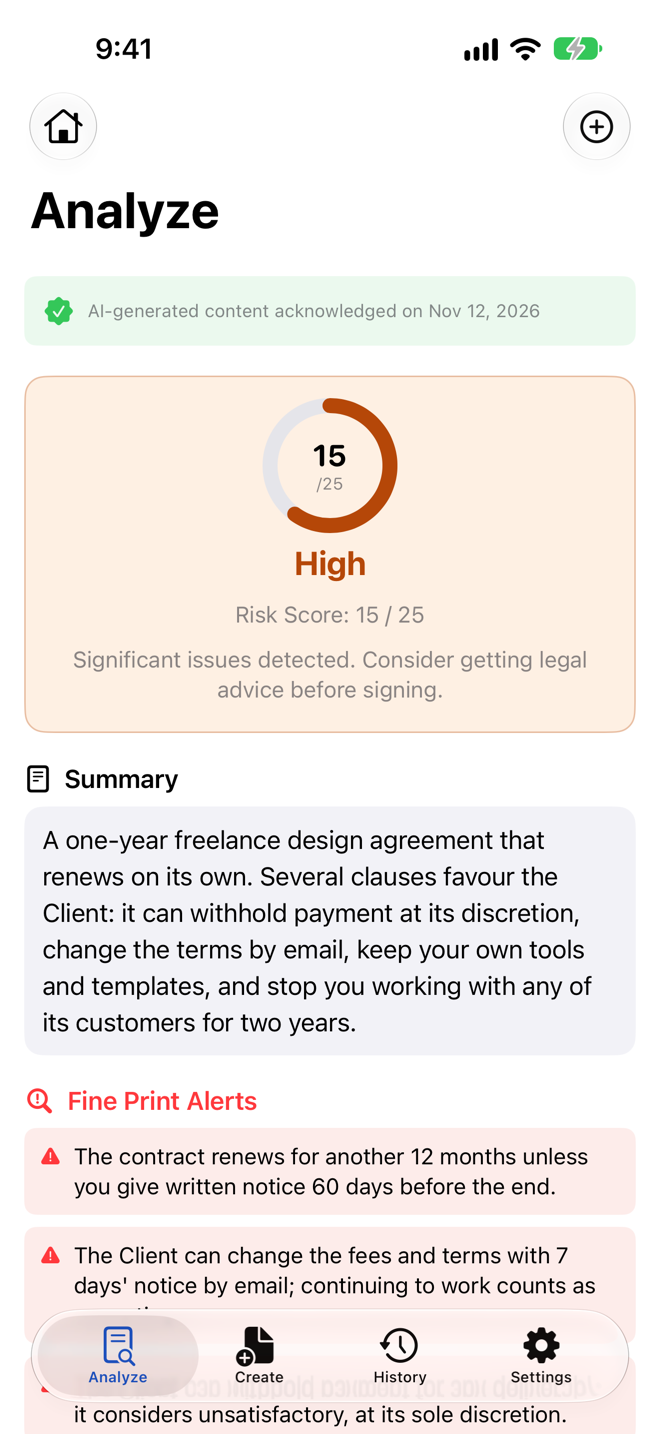
Counsely reads the full text of a contract, scores its overall risk from 1 to 25 and labels every clause Critical, High, Medium or Low. It adds plain-language explanations, a "Way Out" summary of how you can exit the contract, and flags common fine-print problems.
Share a PDF to Counsely from Mail or Files.
Scan a paper contract or import a PDF
You can photograph a paper contract with the camera or import a PDF. Counsely reads contracts in up to 30 languages (PDFs with text; scans: 15+ depending on iOS). Scanned pages go through on-device text recognition (OCR) with Apple Vision. The analysis is written in the app's language, one of its 18 interface languages.
Scan quality affects the result. Use good lighting and a high-contrast background, and import the original PDF when you have one.
The 1–25 risk score and 4 risk levels
The AI model calculates the risk score. Each clause is scored by severity (1–5) × probability (1–5) and given a risk level: Critical, High, Medium or Low. Every clause is color-coded by that level, so you can jump straight to the parts that need attention.
The model also gives the contract an overall score from 1 to 25. This is a composite judgment by the model, not a fixed formula, so read it as a summary and look at the individual clauses.
Plain-language summaries
Next to each clause, Counsely explains what it means in everyday language, so you can decide which points to question.
The summaries describe the text; they do not tell you whether a clause is enforceable where you live.
The "Way Out" summary
The "Way Out" summary pulls together how you can leave the contract: your termination rights, any penalties for ending it early and the notice periods you must respect.
Jurisdiction-aware analysis (Common, Civil and Mixed law)
The same clause can be read differently depending on the legal system behind the contract. When it analyzes a contract, Counsely detects the jurisdiction from the governing-law clause and takes common law, civil law or mixed legal traditions into account. If there is no governing-law clause, the model infers the legal tradition from the contract's language and structure.
This is context, not a compliance check. Counsely does not confirm that a contract meets the laws of a specific country, and local rules change.
What the Fine Print Detector flags
The Fine Print Detector looks for clauses that are easy to miss. Among others, it flags:
- Hidden non-compete and non-solicitation clauses: limits on where you can work, or whose clients and staff you can approach, after the contract ends.
- Unilateral modification rights: wording that lets one side change the terms without your agreement.
- Auto-renewal without clear notice windows: contracts that renew unless you cancel within a short or hard-to-find window.
- Very low liability caps: limits on what the other side would owe you, set far below what is at stake.
- Hidden fees: charges buried in the text.
- One-sided terms: obligations, rights or penalties that apply to only one party.
A flag is a prompt to read the clause carefully; it does not mean the clause is unlawful.
What a review can't do
A Counsely review does not replace a lawyer:
- It can be wrong or miss something. AI analysis may misread a clause or fail to flag a problem.
- It only sees the text. It cannot check facts outside the document, such as whether the other party is who they say they are, or what was agreed verbally.
- Laws vary and change. The analysis may not reflect the laws that apply to you or recent changes to them.
- It is not advice. It cannot tell you whether to sign. For important or high-value contracts, talk to a licensed attorney.
AI contract generator: create a contract from 8 templates
Counsely turns your answers to guided questions into a draft based on one of 8 templates. You enter the jurisdiction and Counsely names it in the draft. Have a local lawyer check it against local law. It exports as a PDF.
How guided creation works
You choose a template, enter the jurisdiction and answer questions about the parties, the work or property, payment, dates and other terms. Counsely drafts the contract from your answers.
The draft includes protective clauses and signature blocks. On every plan, Counsely also runs an automatic risk analysis on the contract it creates, so you see its risk score and colored clauses before you send it.
The 8 templates
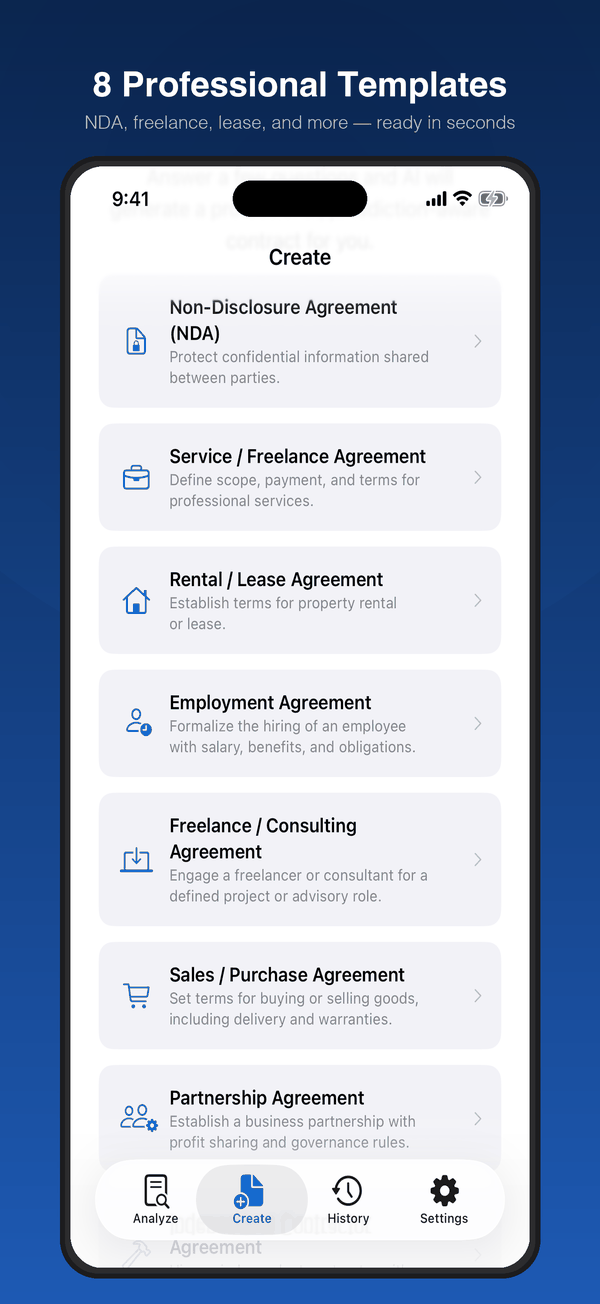
Each of the 8 templates is a starting point, not a guarantee of validity.
- Non-Disclosure Agreement (NDA): use when you need to share confidential information with another person or business and want it kept private.
- Service / Freelance Agreement: for independent professionals who provide a service to a client.
- Rental / Lease Agreement: use when renting out a property, or to set out the terms of a rental you are entering.
- Employment Agreement: use when hiring an employee and setting out role, pay and working terms.
- Freelance / Consulting Agreement: for consulting services, where you provide advice or expertise to a client.
- Sales / Purchase Agreement: use when one party sells goods or assets to another.
- Partnership Agreement: use when two or more people or businesses agree to run a venture together.
- Independent Contractor Agreement: use when engaging someone to do work as a contractor rather than as an employee.
Export a professional PDF
When the draft is ready, you can export it as a professional PDF with branding, signature blocks, page numbering and a notice that the document was generated with AI. You can share the PDF directly from the app.
PDF export is included in the Free plan.
Have a lawyer check it before you sign
A generated contract is a draft. Before you or the other party sign it, especially when money, property or employment is at stake, have a licensed attorney review it.
Bilingual contracts side by side in 30 languages
Counsely generates contracts in 30 languages (7 on Free). On the Pro plan, it can also produce bilingual contracts with both languages side by side.
For contract creation, the Free plan includes 7: English, Arabic, French, German, Italian, Portuguese (Brazil) and Spanish. Pro or credits add the other 23 contract-creation languages (these are not scanning languages): Chinese (Simplified), Chinese (Traditional), Czech, Danish, Dutch, Finnish, Greek, Hebrew, Hindi, Hungarian, Indonesian, Japanese, Korean, Norwegian, Polish, Romanian, Russian, Slovak, Swedish, Thai, Turkish, Ukrainian and Vietnamese.
Bilingual contracts: Pro only. They require an active Pro subscription; credits and the Free plan do not include this feature.
A bilingual contract from Counsely has:
- a two-column layout, one language per column;
- identical section numbering in both languages, so each clause lines up with its translation;
- a language-precedence clause, added automatically.
Which language version wins?
A language-precedence clause states which version prevails if the two languages conflict. Counsely adds this clause automatically, so check which language it names and make sure both parties agree with that choice.
If a bilingual contract matters to you, ask a local lawyer how its two versions will be treated where it may be enforced.
A generated translation is not a certified translation
The second language in a Counsely contract is generated by AI. It is not a certified or sworn translation.
If you need a certified translation, for example to submit a document to an authority, use a qualified translator. Check what applies to you before relying on a generated version.
Privacy: on-device OCR and per-document consent
Counsely reads your scans on your device and sends contract text to its AI provider only after you confirm, for each document.
How your data moves, according to the privacy policy:
- Images and scans: processed on your iPhone or iPad with Apple Vision. They are never uploaded.
- Contract text: relayed to the AI provider, without being stored on our servers, only after you explicitly confirm, document by document. The same consent step applies to your answers in the contract creation assistant.
- The AI provider: A third-party AI provider, accessed through its commercial API. Our AI provider does not use inputs or outputs submitted through its API to train its models by default. It automatically deletes your text within 30 days under its standard API retention policy (longer only where required by law or if flagged for usage-policy violations).
- Storage: no account and no document storage on our servers. Your documents, analyses and contracts are stored locally on your device, with no cloud sync.
- Ads and analytics: No ads. Usage analytics only, never your documents.
Pricing: Free, credits or Pro
Counsely has three ways to pay: a Free plan with 2 analyses and 1 contract creation per month, credit packs from $1.99 that never expire, and a Pro subscription at $9.99/month or $79.99/year.
| Plan | Price | Includes |
|---|---|---|
| Free | $0 | 2 analyses + 1 creation per month, 7 languages for creation, PDF export, auto risk analysis on created contracts |
| Credits | 3 credits $1.99 · 10 credits $4.99 · 25 credits $9.99 · 50 credits $14.99 | 1 credit = 1 analysis, 2 credits = 1 creation; never expire; all 30 creation languages, auto risk analysis on created contracts |
| Pro | $9.99/month or $79.99/year | 30 analyses + 15 creations per month, all 30 creation languages, bilingual contracts, auto risk analysis on created contracts |
Credits do not include bilingual contracts; only Pro does.
Cancel Pro in your iPhone Settings; Apple handles refunds.
Who uses Counsely (use cases)
Renters
Before signing a lease, renters can scan it to see the risk score, check clauses on deposits, renewal and early exit, and read the "Way Out" summary.
Employees
An employment agreement or offer letter can contain a non-compete or non-solicitation clause that is easy to miss. Counsely's Fine Print Detector flags these, so you can ask about them before you accept.
Freelancers
Freelancers can review a client's contract for one-sided terms and liability caps that are too low for the work involved. They can also create a Service / Freelance or Freelance / Consulting Agreement for their own clients.
Small businesses
Small businesses can create an NDA, service, sales or partnership agreement from a template. When they receive contracts from suppliers, the Fine Print Detector flags auto-renewal clauses and terms the other side can change on its own.
Cross-border businesses
Businesses working across countries can create contracts in 30 languages (7 on Free) and, on Pro, bilingual contracts with both languages side by side.
Counsely vs. asking a general chatbot or hiring a lawyer
Counsely gives a structured review with a score, risk levels and per-clause explanations. A general chatbot answers whatever prompt you write. A lawyer gives legal advice and is the right choice when the stakes are high.
| Counsely | General chatbot | Licensed lawyer | |
|---|---|---|---|
| What you get | Risk score (1–25), 4 risk levels, color-coded clauses, "Way Out" summary, Fine Print Detector | A free-form answer to the prompt you write | Legal advice on your situation |
| Data handling | On-device OCR; text sent to AI only after per-document consent | Depends on the service and its settings | Depends on the lawyer and local rules |
| Creates contracts | 8 guided templates with PDF export | Depends on your prompt | Yes, drafted for your case |
| Legal advice | No | Check the service's own terms | Yes |
| Best for | Understanding a contract and preparing questions | General questions | High-value deals, disputes, litigation and important binding signatures |
How to review your first contract in Counsely
Reviewing your first contract takes five steps and one analysis from your Free allowance.
- Download Counsely: AI Contract Analyzer from the App Store on your iPhone or iPad.
- Scan or import the contract. Photograph each page with the camera, or import the PDF.
- Confirm consent. Counsely asks you to confirm before it sends this document's text to the AI provider.
- Read the results. Look at the risk score, the color-coded clauses, starting with Critical and High, and the "Way Out" summary.
- Note your questions. Write down the clauses you want to change or understand better, and take them to the other party or a lawyer.
Guides
- Free NDA generator
- Bilingual contract template
- Arabic-English contract template
- Russian-English contract template
- Contract generator for freelancers
- Spot hidden contract risks
- Lease review checklist
- Partnership agreement template
- Counsely vs Pact
- Pricing
Frequently asked questions
Is Counsely legal advice?
No. Counsely is an AI informational tool; its analyses and drafts are AI-generated and you should consult a licensed attorney before signing or acting on any contract.
What does the 1–25 risk score mean?
It's an overall risk score for the contract, given by the AI model, with every clause color-coded as Critical, High, Medium or Low. Each clause is scored by severity × probability.
What red flags does Counsely look for?
Among others, hidden non-compete and non-solicitation clauses, unilateral modification rights, auto-renewal without clear notice windows, very low liability caps and hidden fees.
Which contracts can Counsely create?
Eight templates: NDA, Service/Freelance, Rental/Lease, Employment, Freelance/Consulting, Sales/Purchase, Partnership and Independent Contractor agreements, exported as PDF.
Can I create a contract in two languages?
Yes, with Pro: bilingual contracts in a side-by-side PDF with identical section numbering and an automatic language-precedence clause. A generated translation is not a certified translation.
Which languages are supported?
Counsely reads contracts in up to 30 languages (PDFs with text; scans: 15+ depending on iOS); generates contracts in 30 languages (7 on Free). For contract creation, the Free plan includes 7 (English, Arabic, French, German, Italian, Portuguese (Brazil) and Spanish). Analyses appear in the app's language, one of its 18 interface languages.
Does my contract leave my phone?
Scanning happens on your device with Apple Vision; the extracted text is sent to an AI provider only after you confirm, for each document. Our relay does not store it, and the provider automatically deletes it within 30 days under its standard API retention policy. Our AI provider does not use inputs or outputs submitted through its API to train its models by default.
Is it safe to upload a contract to an AI app?
It depends on the app's data handling: check whether OCR runs on-device, whether you consent per document, and whether the provider retains or trains on your text.
How much does Counsely cost?
Free gives 2 analyses and 1 creation per month; credit packs start at $1.99 and never expire; Pro is $9.99/month or $79.99/year.
How do credits work?
1 credit = 1 contract analysis and 2 credits = 1 contract creation; credits never expire and stay on the iPhone where you bought them.
Does Counsely work on iPad?
Yes: it requires iOS/iPadOS 18 or later and runs on iPhone and iPad.
Is a contract made by AI legally binding?
Whether any contract is binding depends on the parties' agreement and local law, not on the tool that drafted it; have a lawyer review important contracts before signing.
How do I cancel Pro?
iPhone Settings > Apple ID > Subscriptions > Counsely; cancellation takes effect at the end of the current billing period.
Disclaimer: not legal advice. Counsely is not a law firm and does not provide legal advice. All analyses and contract drafts are AI-generated, may contain errors and may not reflect the laws that apply to you. Always consult a licensed attorney before signing or acting on any contract.
Review or create your next contract with Counsely
Free to download · Free plan includes 2 analyses and 1 contract per month · iPhone and iPad
Questions? See Support and our Privacy Policy.
Written by Caetano Spuldaro Neto, developer of Counsely · Last updated October 11, 2026